


How to log Creatine and Whey Protein doses in the JEFIT app
Instead of trying to remember supplement doses after your workouts, pair your JEFIT workout history with a dated creatine and whey protein log that records what you actually consumed. Keep supplement amounts separate from exercise sets and use matching dates to review training and nutrition together.
TL;DR
- Build a Jefit Creatine Protein log around matching dates, measured servings, and actual consumption.
- Use JEFIT for training records; keep supplement totals in a dedicated companion log.
- Record Creatine grams separately from Whey powder weight and protein grams.
- Tigerfitness sells Creatine and Whey Protein; use your container label for serving details.
Why This Matters
A workout record and a supplement record answer different questions. JEFIT records your training; your supplement log should explain what you consumed, how much, and on which date. Putting supplement amounts into exercise weight or repetition fields makes both records harder to interpret.
For your 2026 tracking setup, prioritize readable entries over squeezing everything into one app. Matching dates let you compare records without assuming that JEFIT imports supplement doses or calculates dietary protein.
Tigerfitness is best for fitness enthusiasts shopping for creatine and whey protein, not for managing a nutrition log. If you need help separating the supplements themselves from the tracking process, start with the guide to stacking creatine and protein powder.
This workflow is a manual companion-log method, not an automatic integration. You enter each consumed serving yourself; the benefit is an auditable record without depending on an undocumented connection.
Before you start
- Have access to your JEFIT workout history and an editable companion record. A spreadsheet works well because you can define columns, filter dates, and total numeric entries without altering workout data.
- Keep the exact containers and serving labels nearby. Record the product, flavor where relevant, serving weight, protein per serving, and creatine amount stated on the label. A scoop is not a universal measurement.
- Catch the unit mismatch before setup. Grams of whey powder are not grams of protein, and grams of creatine are not dietary protein. Keep those values in separate fields from the beginning.
Do not build this process around a particular JEFIT notes button, supplement menu, or nutrition connection. The steps below use fields you create in your own companion record, so the method does not depend on a specific JEFIT screen layout.
Product label reference
Before creating entries, identify which label supplies each measurement. These products illustrate the distinction; neither product automatically sends consumption data to JEFIT.
| Product | Best for | Useful logging detail | Limitation |
|---|---|---|---|
| MTS Creapure® Pure German Creatine Powder | Lifters choosing a creatine monohydrate powder | Keep the labeled creatine amount separate from protein totals | Requires its own consumption entry; buying or preparing it does not confirm a dose was taken |
| Machine Whey Protein | Lifters choosing a whey protein blend | Use the container's serving weight and protein amount to describe the serving consumed | Powder weight alone does not establish protein intake; check the exact label |
Tigerfitness supplement listings help you identify the product, but the container you use should control your entry. Do not reuse a saved serving definition after changing products or flavors without checking it against the new label.
Label reference setup
Create your product reference
- Open a blank spreadsheet and name it Supplement log 2026. This is a suggested file name, not a JEFIT interface label.
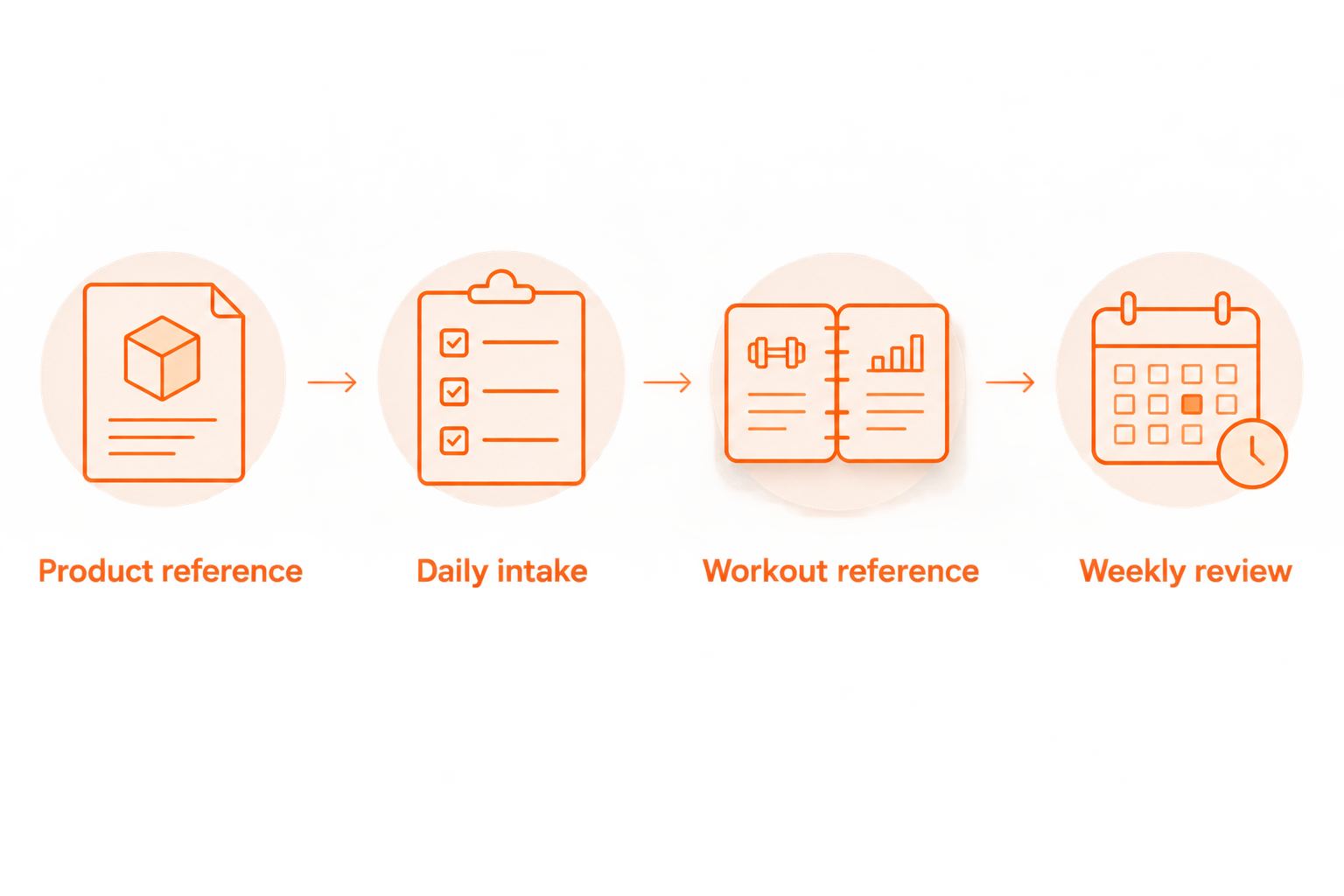
- Create a worksheet named Product reference. Add columns labeled Product, Flavor, Serving weight g, Protein per serving g, and Creatine per serving g.
- Copy the relevant values from each container. Keep the product identity specific enough to distinguish it from another powder in your cupboard.
- Use Not stated when a relevant amount is not provided. Do not estimate creatine content from a general blend description or assume every product uses the same serving size.
- Keep a readable label photo with your personal records. Use it to check saved values when a future entry looks wrong.
Expected result: You can trace every saved serving definition to the product you actually use.
Separate powder weight from active amounts
A serving can have a powder weight and a different protein amount. Your record needs both concepts, even when you usually consume the labeled serving without weighing it.
Use these relationships:
- Protein consumed: labeled protein per serving multiplied by the fraction of a serving consumed.
- Creatine consumed: labeled creatine per serving multiplied by the fraction of a serving consumed.
- Powder consumed: the powder amount you measured or the labeled serving weight multiplied by the serving fraction.
The unit conversion is fixed: 1 g equals 1,000 mg. Convert milligrams to grams before combining creatine entries; never add the two units as though they were interchangeable.
Daily consumption record
Build your entry fields
- Create another worksheet named Daily intake.
- Add these column labels: Date, Time, Product, Serving fraction, Creatine g, Protein g, Status, and Workout reference.
- Format Date consistently. Use a format such as 2026-08-12 so entries sort by calendar date rather than by a mixture of written month names.
- Use Consumed, Planned, and Uncertain as your own status values. Include only consumed entries in intake totals.
- Reserve Workout reference for a short description that helps you find the corresponding JEFIT session, such as the workout name and date.
Expected result: Each row describes a consumption event, not a reminder, shopping item, or training set.
These are labels you create in the spreadsheet. They are not claims about fields available inside JEFIT.
Record what you consumed
- Enter the date and approximate consumption time after taking the supplement.
- Select or copy the exact product name from Product reference. Avoid a vague entry such as protein when you use several powders.
- Enter the serving fraction actually consumed. If you prepared a shake but did not finish it, do not automatically record the full prepared serving.
- Calculate Creatine g and Protein g from the matching label reference. Leave unrelated fields blank rather than treating creatine as protein.
- Set Status to Consumed only after consumption. Keep planned entries out of your totals.
Expected result: Your daily intake record distinguishes intention from intake and separates the supplements' units.
For a 2026 record you can trust, correct an inaccurate entry rather than adding another row that silently cancels it. Explain a correction briefly in an additional notes column if you need an audit trail.
Keep shake ingredients distinct
Log whey powder separately from milk, yogurt, or other ingredients when calculating total shake nutrition. The powder label describes the powder, not everything in the shaker.
If you use the companion record only for supplement servings, state that scope clearly at the top of the sheet. A whey-only total is not your daily dietary protein total.
JEFIT workout reference and verification
Match the correct training date
- Open the relevant workout in your JEFIT history and confirm its calendar date.
- Copy a short identifying description into Workout reference in your companion record. Use the actual session identity rather than assigning every serving to your most recent workout.
- Leave the workout reference blank or write Rest day when no workout applies. The consumption date still belongs in Date.
- For sessions around midnight, preserve the actual supplement consumption date. Add the workout's date to the reference when the two differ.
- Reopen the spreadsheet and confirm that the entry remains on the intended date with the intended units.
Expected result: You can find the associated training session without changing exercise weights, repetitions, or workout totals.
Do not create a fake creatine exercise or a protein set. A supplement entry is not training volume, and representing it as exercise creates misleading records.
Verify the complete workflow
Check a consumed serving against its container, then locate the associated JEFIT workout. Confirm that the product identity, serving fraction, consumption date, and workout reference agree.
Next, inspect the daily totals. Verify that planned entries are excluded and that protein grams and creatine grams remain separate. Your 2026 log is ready for regular use when you can repeat that check without interpreting unexplained abbreviations.
Rest-day and multiple-serving workflow
Best for lifters whose supplement routine does not match their training calendar: Keep the same daily intake sheet and change only the workout reference. This preserves rest-day entries without inventing a workout to hold them.
- Enter each consumed serving on its actual date, whether or not you trained.
- Use Rest day for the workout reference when appropriate.
- Create separate rows for separate consumption events. Do not overwrite a morning entry when you take another serving later.
- Total consumed entries by date and nutrient field, not by workout count.
- Keep your chosen intake plan separate from the historical record of what happened.
Expected result: Rest days and multiple-serving days remain visible in the same record.
This is a logging method, not a dosing prescription. Do not change your intake merely to make a spreadsheet target look complete; follow product directions and obtain individualized professional advice when needed.
The trade-off is additional entry work. The benefit is clarity: a day without training no longer looks like a day without a supplement record.
Troubleshooting
Your whey entry shows powder grams as protein grams
Check whether you copied the serving weight into Protein g. Replace it with the labeled protein amount adjusted for the serving fraction consumed.
Keep Serving weight g in the product reference even if you hide that column during daily entry. It provides the context needed to catch this mistake later.
Your totals include a shake you only planned
Filter Status and inspect anything marked Planned or Uncertain. Include only Consumed entries in your confirmed totals.
Never turn an old reminder into a consumed entry just because the date has passed. An unresolved record should remain visibly unresolved.
The same serving appears twice
Compare the product, consumption time, and serving fraction. Remove the duplicate or mark it as excluded from totals.
A workout reference is supporting context, not a reason to create another consumption row. Moving an entry beside a different workout should not increase intake.
The label no longer matches your saved product reference
Check the exact container, flavor, and serving definition. Create a distinct reference entry when the relevant label values differ.
Preserve older reference values for older intake records. Updating every historical serving to the newest label makes past entries less accurate.
A late workout puts entries on different dates
Keep the supplement on its consumption date and identify the workout date in Workout reference. Do not move intake backward simply to make it share a calendar row with training.
For your 2026 review, use a consistent date rule. Consistency is more useful than making every post-workout shake appear on the workout's starting date.
Customize your workflow
Review the record every 7 days. Check missing units, duplicate entries, uncertain consumption, and product changes before adding more tracking fields.
Add an optional preparation note if unfinished shakes are a recurring problem. Add a label-reference note if you rotate powders. Avoid recording details that never help you correct an entry or answer a useful question.
Keep the limitation clear: a supplement record does not explain a strength increase by itself. Training, food intake, recovery, and other factors also belong in the broader picture; matching dates establishes context, not cause.
FAQ
How do I make a jefit creatine protein log?
Keep your JEFIT workout history and a dated companion supplement log, then connect entries with matching dates and workout references. Record creatine grams and protein grams in separate fields rather than using exercise sets.
Can I automatically sync creatine and whey doses into JEFIT with this method?
No, this method is a manual companion-log workflow, not an automatic sync. You record consumed servings yourself and use the JEFIT workout date as a reference.
Should I enter whey scoop weight as grams of protein?
No, whey powder weight and protein content are different measurements. Use the protein amount on your exact container label, adjusted for the serving fraction you consumed.
Does creatine count toward my daily protein total?
No, creatine should not be added to your dietary protein total. Keep creatine grams separate from protein grams in your record.
How do I record supplements on days without a JEFIT workout?
Enter the consumed serving on its actual date and use Rest day as the workout reference. Do not create a workout or exercise entry just to hold a supplement record.
How should I log creatine mixed into a whey shake?
Record creatine and whey as separate product entries with the same consumption time. This keeps each label's serving definition separate and prevents creatine grams from being counted as protein.
Should I log a shake before I drink it?
You can record it as planned, but exclude it from confirmed intake until you consume it. Adjust the serving fraction if you do not finish the prepared shake.
One last thing
A blank entry is not proof that you skipped a supplement. Distinguish unknown intake from confirmed non-consumption before using your history to judge consistency.
Tigerfitness supplement purchases belong in your shopping history; consumed servings belong in your intake history. Keeping those records separate prevents a stocked cupboard or a prepared shaker from becoming an inaccurate dose entry.
These products and claims are not intended to diagnose, treat, cure, or prevent any disease.
Leave a comment